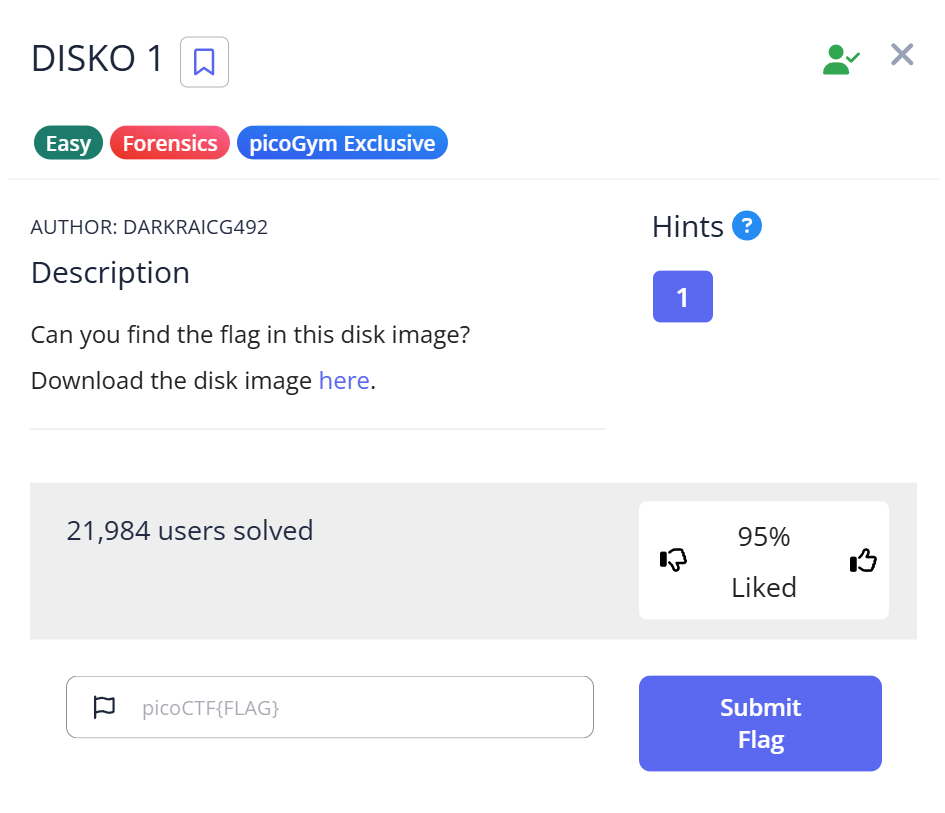
📋 Challenge Information
Objective: Extract a hidden flag from a compressed disk image.
Platform: picoCTF
Challenge Name: DISKO 1
Category: Forensics
✨Introduction: Why Disk Forensics is Like Digital Archaeology
When I first saw the file extension .dd.gz, I’ll admit I was a bit intimidated. A “disk image” sounds like something you’d need professional, heavy-duty forensics software to open. But here’s a secret I learned: Disk forensics is often just about knowing how to peel the layers of an onion.
In this guide, I’ll show you how I used standard Linux tools to “look inside” a virtual hard drive. If you’re a beginner feeling lost in a sea of binary data, this step-by-step journey will turn that confusion into a systematic workflow.
🕵️ Challenge Overview
We are given a file: disko-1.dd.gz.
- The Goal: Find the
picoCTF{...}string hidden somewhere in this virtual drive. - The Layer 1 (.gz): A compressed wrapper.
- The Layer 2 (.dd): A “Raw Disk Image”—a sector-by-sector clone of a storage device. Unlike
.isofiles (optical media), a.ddfile captures everything, including unallocated space.
🛠️ My Forensic Toolbox (The “Why” Behind the Tools)
- gunzip: To strip away the compression layer.
- file: To verify the filesystem.
- strings: My favorite “brute-force” tool. I chose not to ‘mount’ the disk image here. In real forensics, mounting can alter timestamps or metadata. Using
stringsis safer and much faster for a quick flag hunt. - grep: The filter that saves us from scrolling through thousands of lines of junk.
🏁 Step-by-Step Analysis: The “Golden Path”
📂 Step 1: Decompression
$ ls
disko-1.dd.gz
$ gunzip disko-1.dd.gz
$ ls
disko-1.dd
My Thought Process: After running gunzip, the original .gz file disappears. Now we have the .dd file—the “raw DNA” of the disk.
🧐 Step 2: Identifying the “Internal DNA”
$ file disko-1.dd
disko-1.dd: DOS/MBR boot sector, code offset 0x58+2, OEM-ID "mkfs.fat", Media descriptor 0xf8, sectors/track 32, heads 8, sectors 102400 (volumes > 32 MB), FAT (32 bit), sectors/FAT 788, serial number 0x241a4420, unlabeled
Observation & Insight: The file command revealed a FAT32 filesystem. This is a huge hint. FAT32 is simple and old, meaning it doesn’t have complex encryption. This told me the flag might just be sitting there in plain text.
📜 Step 3: Extracting Human Intelligence (Strings)
A .dd file looks like gibberish in a text editor.
$ strings disko-1.dd | head -n 20
The “Aha!” Moment: Running strings produce a wall of text. But I saw directory names and file metadata, confirming the data is unencrypted.
More information about strings can be found here.
strings Command in CTF: How to Extract Hidden Data from Binaries
🎯 Step 4: The Surgical Strike (Grep)
$ strings disko-1.dd | grep "pico"
...
picoCTF{1t5_ju5t_4_5tr1n9_be6031da}
Success! The flag appeared instantly.
🚩 Capture the Flag
The flag was found embedded directly in the disk’s data:
picoCTF{1t5_ju5t_4_5tr1n9_be6031da}
Reflecting on the Flag: The flag says “it’s just a string”. This is a cheeky reminder from the creators: sometimes we overcomplicate things by trying to mount disks when a simple string search is all we need!
💡 Advanced Takeaways for Beginners
1. The “Manual” Advantage
In real investigations, we avoid mounting images to prevent data contamination. Tools like strings allow us to analyze the “cold” data without changing a single bit.
2. Pro Tips for strings and grep
If a simple search fails, try these “pro” options:
strings -n 10: Only show strings 10+ characters long to filter out “noise.”grep -i "pico": Ignore case sensitivity (PICO vs pico).grep -A 5 -B 5: Show 5 lines before and after the match. This is great for finding context around a flag.
3. What if the flag was hidden in a file?
If strings didn’t work, my next step would be using binwalk -e disko-1.dd to extract any hidden files (like JPEGs or ZIPs) buried inside the partitions.
📖 Summary
By following the Decompress → Identify → Extract → Search workflow, you can tackle most entry-level forensics challenges. Remember: The data is there; you just need the right lens to see it.
Happy Hunting!
📚 Further Reading
Here are related articles from alsavaudomila.com that complement this challenge: