
As a beginner in CTF (Capture The Flag), you often encounter walls that seem insurmountable. But sometimes, the biggest challenge isn’t a complex script—it’s overthinking. In this writeup, I’ll walk you through the “Includes” challenge from picoCTF, sharing my stumbles, my “Aha!” moments, and why this simple problem is a fundamental lesson for every aspiring security engineer.
1. Challenge Overview
- Name: Includes
- Category: Web Exploitation
- Difficulty: Easy (picoGym)
- Objective: Find the hidden flag in the provided web page.
2. My Thought Process & Trial (The Struggle)
When I first opened the challenge link, I saw a simple website. My mind immediately jumped to complex vulnerabilities: “Is it SQL injection? Cross-Site Scripting (XSS)?” I spent 10 minutes trying to inject payloads into non-existent forms.
The Failure: I was looking for a “door” that didn’t exist instead of looking at the “blueprints” of the house.
The Trial & Error Table
| Step | Action | My Internal Monologue (Thinking) | Result | Lesson Learned |
| 1 | Scan the Home Page | “Maybe there’s a hidden button or an admin login?” | Nothing but text. | Don’t overcomplicate. |
| 2 | Check Cookies | “Is the flag in the Session Storage?” | No cookies found. | It’s not a session-based challenge. |
| 3 | View Page Source | “Back to basics. Let’s see how this page is built.” | Found references to script.js and style.css. | Crucial Step. Flags are often split. |
| 4 | Check style.css | “CSS is for design, but what if…?” | Found Part 1 of the flag! | Comments in CSS are goldmines. |
| 5 | Check script.js | “If it’s split, the rest must be here.” | Found Part 2 of the flag! | Developers often leave ‘Includes’ messy. |
Step 1:Open the website and inspect HTTP traffic with Burp Suite
After launching the instance and opening the site in your browser, we use Burp Suite to observe what the browser requests and what the server responds.
- In Burp Suite, go to Target → Site map to find the site host and links.
- Then open Proxy → HTTP history to view a list of HTTP requests and responses.
What this does: Burp Suite acts as a proxy between your browser and the web server so you can see every request/response (headers, body, URLs). This is useful to discover linked files (scripts, stylesheets) that aren’t obvious just from looking at the page.
Step 2:Interact with the page and notice the button
On the page there is a button:
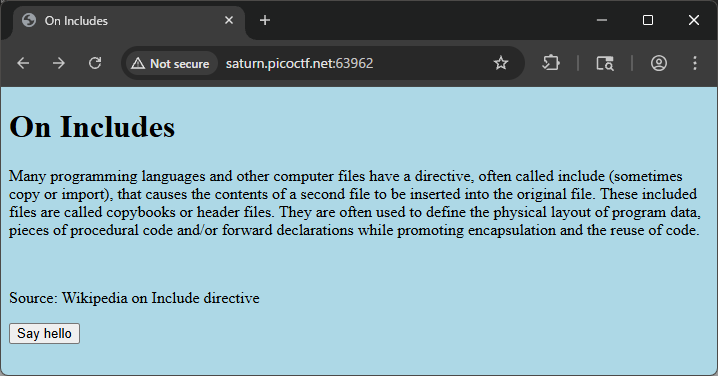
<button type="button" onclick="greetings();">Say hello</button>
Clicking it shows a popup with the text:
This code is in a separate file!
What this means: The page tells us the implementation (the code) lives in an external JavaScript file rather than inline in the HTML. The onclick="greetings()" reveals a greetings() function exists somewhere.
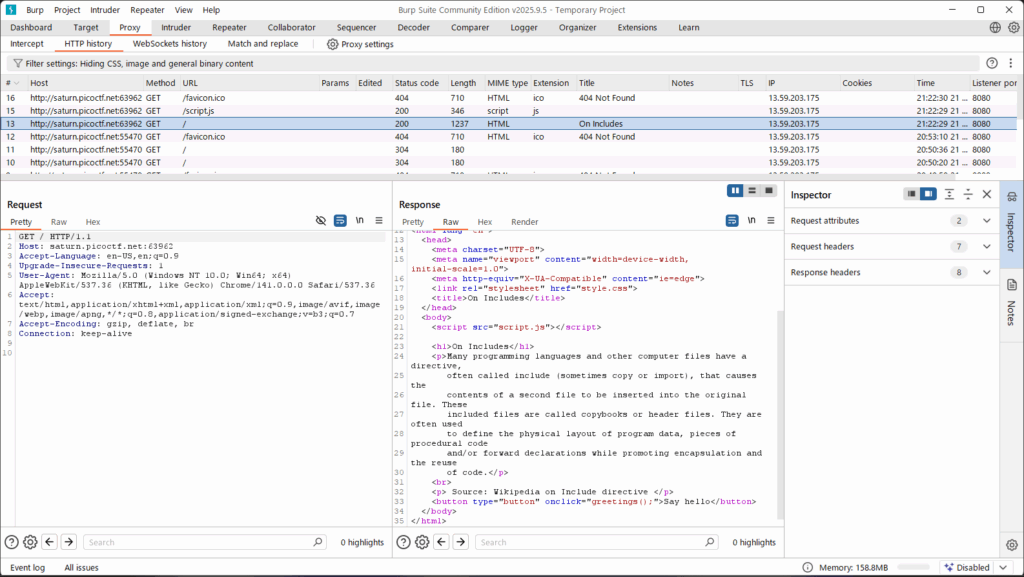
Step 3:Analyze the HTML Source
Right-click on the page and select “View Page Source” (or press Ctrl+U). Inside the <head> tag, you’ll notice two external files being included:
<link rel="stylesheet" type="text/css" href="style.css">
<script src="script.js"></script>
Step 4: Extracting the CSS Flag
Click on style.css. While CSS is usually for layout, developers often leave comments during debugging.
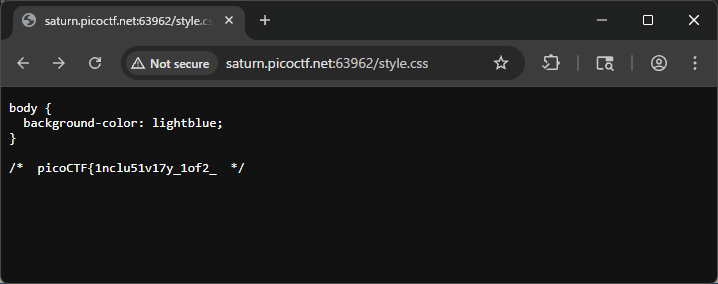
CSS
/* ... snippets of CSS code ... */
/* picoCTF{1nclu51v17y_d1v1d3nd_  */
Found: picoCTF{1nclu51v17y_d1v1d3nd_ (Part 1)
body {
  background-color: lightblue;
}

/*  picoCTF{1nclu51v17y_1of2_  */
Step 5: Extracting the JS Flag
Now, open script.js. JavaScript is executed by the browser, but the source code is entirely public.
JavaScript
// ... snippets of JS code ...
//  82b31143}
Found: 82b31143} (Part 2)
Final Flag: picoCTF{1nclu51v17y_d1v1d3nd_82b31143}
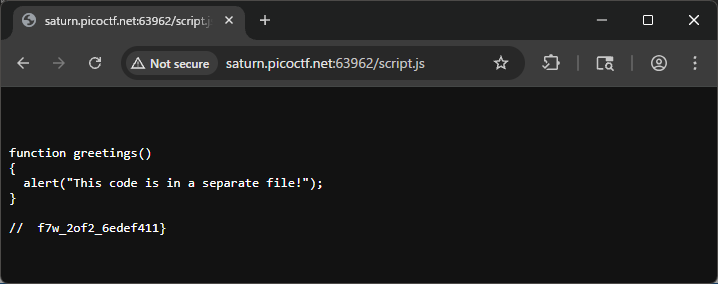
function greetings()
{
  alert("This code is in a separate file!");
}

//  f7w_2of2_6edef411}
Step 6: Combine the two parts
By joining the flag fragments found in the CSS and JS comments:
- From
style.css:picoCTF{1nclu51v17y_1of2_ - From
script.js:f7w_2of2_6edef411}
You get the full flag:
picoCTF{1nclu51v17y_1of2_f7w_2of2_6edef411}
4. Deep Dive: Why “Includes” Matter in the Real World
This challenge is named “Includes” because it highlights how web applications pull in resources. In the real world, this is a lesson in Information Disclosure.
The Security Risk
Developers often forget to “minify” or “strip” comments from their production code.
- In CTF: It’s a flag.
- In Reality: It could be internal API keys, developer names, or paths to private directories. Leaving comments in “Included” files (JS/CSS) is a common mistake that gives attackers a map of your infrastructure.
Pro-Tip for Beginners
When using curl to check files quickly without a browser:
Bash
curl http://[URL]/style.css
curl http://[URL]/script.js
Using the terminal makes you faster and helps you stay focused on the data rather than the visual layout.
5. Troubleshooting & FAQ
- Q: I only found half of the flag!
- A: This is a classic picoCTF trope. If a flag looks incomplete (no closing
}), always check the other “Included” files.
- A: This is a classic picoCTF trope. If a flag looks incomplete (no closing
- Q: Why isn’t the flag in the HTML?
- A: Modern web development separates structure (HTML), style (CSS), and logic (JS). You must check all three layers.
Final Thoughts
Solving “Includes” was a reminder to always start with the basics. I felt a rush of adrenaline when I saw the comment in style.css because it confirmed that my “hacker intuition” was starting to develop.
If you are a student just starting CTF, don’t feel bad if you didn’t find this immediately. The “Insecure Direct Object Reference” or “Information Disclosure” mindset takes time to build. Keep digging!
Further Reading
If you enjoyed the “Includes” challenge, you’ve taken your first step into the world of CTFs. To help you continue your journey, I have curated three more writeups that cover essential concepts in Forensics and Cryptography. These challenges will push you to think deeper about file structures and mathematical vulnerabilities.
- Mastering Disk Analysis: Disko 1 – picoCTF Writeup https://alsavaudomila.com/disko-1-picoctf-writeup/ Moving beyond simple source code inspection, this challenge introduces you to the world of Digital Forensics. In this writeup, I explain how to analyze disk images using tools like
Sleuth Kit (mmls, fls). It’s a great follow-up because it shifts your perspective from the web browser to the underlying file system, teaching you how to find hidden partitions and recover “deleted” information. - The Art of File Repair: Corrupted File – picoCTF Writeup https://alsavaudomila.com/corrupted-file-picoctf-writeup/ What do you do when a file simply refuses to open? This article deep dives into “Magic Bytes” and file signatures. I share my experience of using hex editors (
xxdorhexeditor) to manually repair a broken PNG header. If you want to understand how a computer actually identifies a file type regardless of its extension, this is a must-read for any aspiring forensics expert. - Breaking Encryption: Mini RSA – picoCTF Writeup https://alsavaudomila.com/mini-rsa-picoctf-writeup/ If you’re interested in the mathematical side of security, this writeup explores a classic weakness in RSA encryption: the small public exponent. I walk through the process of how “too much efficiency” can lead to total vulnerability, allowing us to decrypt secrets by simply calculating an nth root. It’s a perfect introduction to Cryptography that doesn’t require a PhD to understand.
Leave a Reply